Wedding Website vs Wedding App vs Digital Invitation: What's the Difference?
A digital invitation asks, a wedding website informs, and a wedding app helps you plan. What each one is, who sees it, a side-by-side comparison, and which combination fits your wedding.
Search for wedding tech and three words keep coming up: wedding website, wedding app and digital invitation. They sound interchangeable, and many tools blur them on purpose. But each one does a different job for a different person. If you're comparing digital wedding invitation vs wedding website options, or wondering whether you need a wedding app at all, the quickest answer is this: the invitation asks, the website informs, and the app helps you plan.
Below we explain each one neutrally, compare them side by side, and show which combinations make sense for which weddings.
Disclosure: Wedding Plan is our product and it offers all three, so the screenshots come from it. The comparison itself applies to any tool.
The short answer
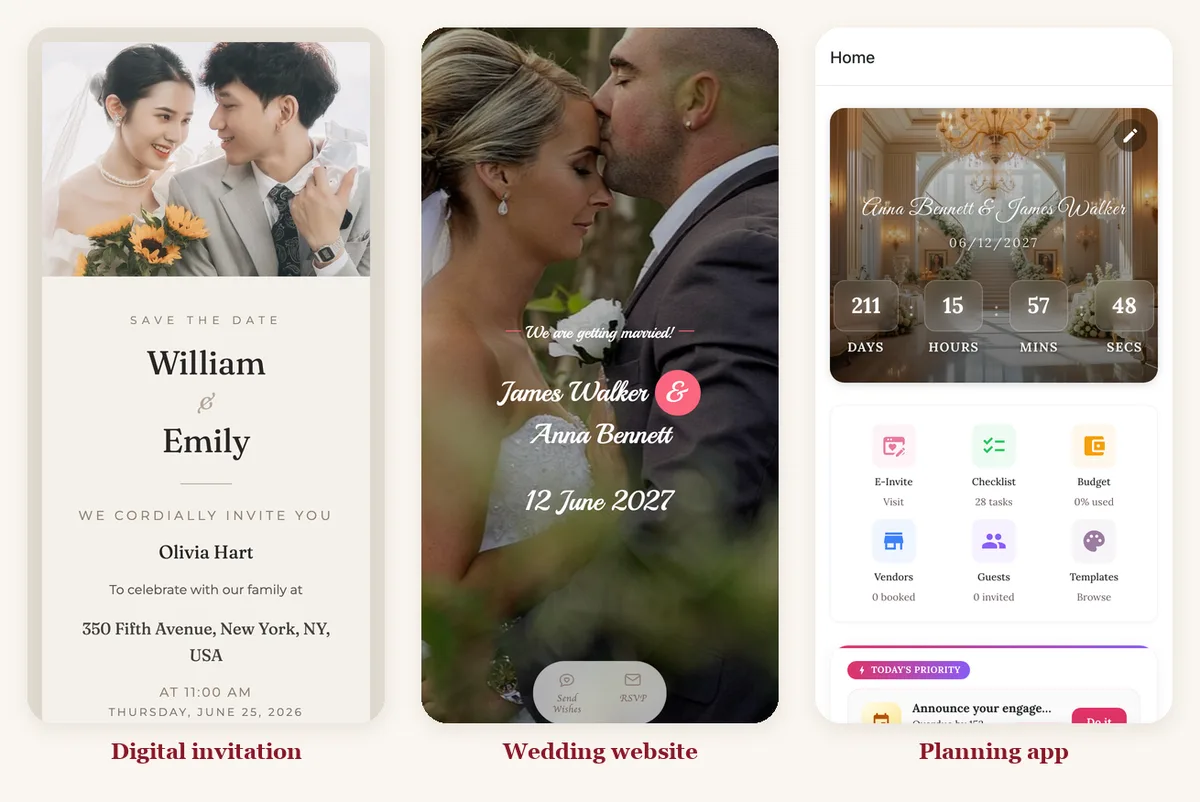
- Digital invitation: a card you send to each guest by message or email. It says "you're invited" and asks for an RSVP. Guests see it once or twice.
- Wedding website: one page (or a few) with everything guests need to know: schedule, venues, maps, photos, FAQs. Guests come back to it many times.
- Wedding app: usually means a planning app for the couple: checklist, budget, vendors, guest list. Guests often never see it.
What is a digital wedding invitation?
A digital invitation is the online version of the paper card. It has your names, the date, the time and the venue, plus a way to reply. You send it by WhatsApp, text, Messenger or email instead of by post.
Who sees it: each guest, usually in the first few seconds after they open your message.
Strengths:
- It feels like an invitation. Many digital invitations can greet the guest by name, which a website can't do on its own.
- It's fast to read. One screen, one clear question: are you coming?
- RSVPs can be tied to the guest. If each guest has their own link, you know exactly who replied.
- No printing and no postage, and a change of time doesn't mean reprinting.
Limits:
- Little room for details. Hotels, dress code, parking and the day's timeline don't fit on a card.
- Sending is per guest. A personal card for 120 guests means 120 messages.
- Some guests, often older relatives, still expect paper. Many couples print a few cards for them.
In Wedding Plan, the invitation opens with the guest's name in the greeting and two buttons underneath: Confirm attendance and Back to Wedding Website. When you paste the link into a chat, the preview reads "You're invited, [guest] — [your names]". There's more on how this works in our guide to the personalized wedding website link for each guest.
What is a wedding website?
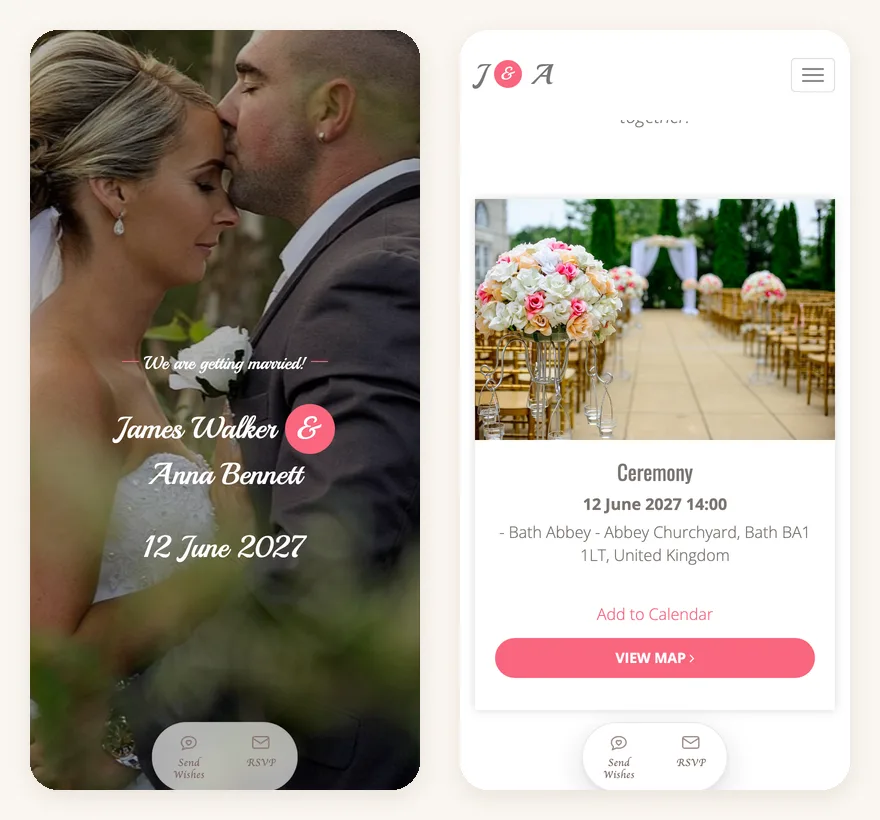
A wedding website is a page at a web address you share, such as weddingplan.online/anna-and-james. It holds everything a guest might ask you: when and where each event happens, maps, your story, photos, the wedding party, and an RSVP form.
Who sees it: all your guests, repeatedly. They check it when they book travel, again the week before, and again on the day to find the address.
Strengths:
- One link for everything. Update it once and everyone sees the latest version, no resending.
- Space for detail: several events, maps, an "Add to Calendar" button, a travel and accommodations section, photos.
- Easy to share in bulk: one link in a group chat, or a QR code on a printed card.
- Guests can RSVP and leave wishes without an account.
Limits:
- It's the same page for everyone. Without personal links, it can't greet guests by name or show different events to different people.
- A shared link can be forwarded. On Wedding Plan, couple websites are hidden from Google (they carry a "noindex" tag), but there is no password. If you need an access code, check whether your builder offers one.
- It isn't permanent on every plan. On Wedding Plan, a free site stays online for 3 months, a VIP site for 1 year and a SUPER VIP site for life.
Still deciding whether you need a site at all? Do you need a wedding website? has a quick checklist.
If you're building one now, our step-by-step guide on how to make a wedding website covers it in about an hour.
What is a wedding app?
"Wedding app" means two different things, which causes most of the confusion:
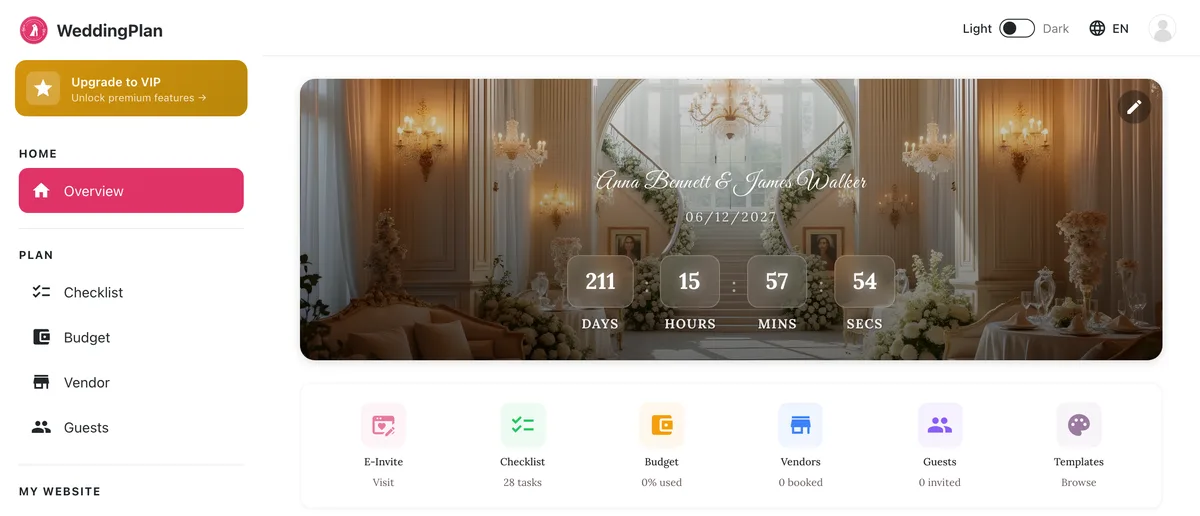
- A planning app for the couple. A to-do list, budget tracker, vendor contacts and guest list, usually on your phone. This is the common meaning.
- A guest app. An app guests download to see the schedule or share photos. Fewer couples use these now, because asking 100 people to install something is a hard sell.
Who sees it: mostly the two of you, plus anyone you invite to help, such as a parent or planner.
Strengths:
- It keeps the planning in one place: tasks with due dates, what you've spent, who you've booked.
- The guest list lives next to the RSVPs, so headcounts update as replies come in.
- It's in your pocket when a vendor calls.
Limits:
- Guests don't benefit directly unless the app also produces something they can open, like a website or invitation.
- Guest apps add friction. If guests must download an app, many won't.
- Free tiers have caps. On Wedding Plan's free plan, the guest list holds 20 guests outside Vietnam (50 on VIP, 999 on SUPER VIP). RSVPs through the website aren't capped.
Digital wedding invitation vs wedding website vs app: side by side
| Digital invitation | Wedding website | Planning app | |
|---|---|---|---|
| Main job | Invite and ask for an RSVP | Inform guests about everything | Help the couple plan |
| Who uses it | Each guest | All guests | The couple (and helpers) |
| How often it's opened | Once or twice | Many times, up to the day | Daily, for months |
| Personal to each guest | Often (name, events) | Same page for everyone | Not guest-facing |
| Amount of detail | Card-sized | As much as you need | Private notes, budgets, tasks |
| How you share it | One message per guest | One link or QR code for all | Not shared (except with helpers) |
| RSVP | Yes, tied to the guest if links are personal | Yes, guest types their name | Collects and counts RSVPs |
| Guest needs an account | No | No | Not applicable |
Which one do you need?
Most couples end up with two of the three. Here's how it usually breaks down:
- Small, informal wedding (under about 30 guests, one event): a wedding website is often enough. Post the link in the family group chat and let people RSVP there.
- Guests traveling, several events, or lots of questions: you want the website. A card can't hold hotel tips and a weekend timeline.
- You need exact headcounts, or not everyone is invited to everything: add personal digital invitations, so each reply lands on the right guest and each guest sees only their events.
- Big guest list, many vendors, a real budget: a planning app (or at least a wedding checklist and wedding budget tool) saves you from spreadsheets scattered across two phones.
- Formal wedding with older guests: print a small run of paper invitations with a QR code to the website, and send digital ones to everyone else.
A common, low-effort combination: a website for the details, personal invitation links for family and anyone whose headcount matters, and a single shared link for big friend groups.
How they fit together
The three work best when they're connected, so information is entered once:
- You plan in the app: events, guest list, checklist, budget.
- The events you enter appear on your website automatically, with times, addresses and maps.
- Each guest on your list can get a personal invitation for the events you ticked. The card links back to the website for the full details.
- RSVPs from the invitation and the website flow back into your wedding guest list, so the numbers stay current.
That's how Wedding Plan is built: one account gives you the planner (on iPhone, Android and the web), the couple website, and per-guest invitation cards. If you use separate tools instead, expect to copy event details between them and to merge RSVP lists by hand. That's workable, but it's where typos and double-counting creep in.
FAQ
Is a digital invitation the same as a wedding website?
No. A digital invitation is a card for one guest that asks them to come and reply. A wedding website is a page for all guests with the full details. Many couples send the invitation and link it to the website.
Do I need a wedding website if I send digital invitations?
If your wedding is one event with nothing to explain, maybe not. If guests need maps, hotel tips, a schedule or a dress code, yes: those details don't fit on a card.
Do guests need to download an app?
Not with a website or a link-based invitation. Both open in any browser. Only the couple uses the planning app.
Can I use a website and still send paper invitations?
Yes, and it's common. Put the website address or a QR code on the paper card so guests can find the details and RSVP online.
Next steps
Want all three in one place? Start with the free wedding website builder and browse the wedding website templates. Then add your events and guests, and send the first invitation to yourself to see exactly what your guests will see.