What to Put on a Wedding Website (Checklist + What to Leave Off)
What to put on a wedding website, sorted into must-haves, nice extras and things to leave off for privacy, plus the etiquette on registries and who's invited. Ends with a checklist you can print.
Not sure what to put on a wedding website? Start with what your guests need to show up on the right day, at the right place, dressed for it: names, date, times, addresses, and a way to RSVP. Everything else is optional. This checklist sorts it into must-haves, nice extras and things to leave off, with a few etiquette rules that save awkward conversations later.
We use a real sample site for the examples: James and Anna's wedding in Bath on 12 June 2027 (sample couple, sample data).
Disclosure: Wedding Plan is our product and the screenshots come from it. The checklist works for any wedding website builder.
What to put on a wedding website: the must-haves
If a guest reads only one screen, these are the facts they need. Put them first.
- Your names and the date. Use the names people actually know you by. A countdown is a nice touch, and most builders add one automatically.
- Each event, with time and full address. List every part of the day guests are invited to: ceremony, reception, welcome drinks. Give the venue name, the street address and a map link. "The Old Barn" means nothing to a taxi driver.
- RSVP. A clear button and a deadline. This is the main reason many couples make a site at all.
- Who's invited. Say plainly whether children and plus-ones are included. More on this below.
- A way to reach you (or a named helper) for questions. A phone number for the best man or a parent works well on the day.
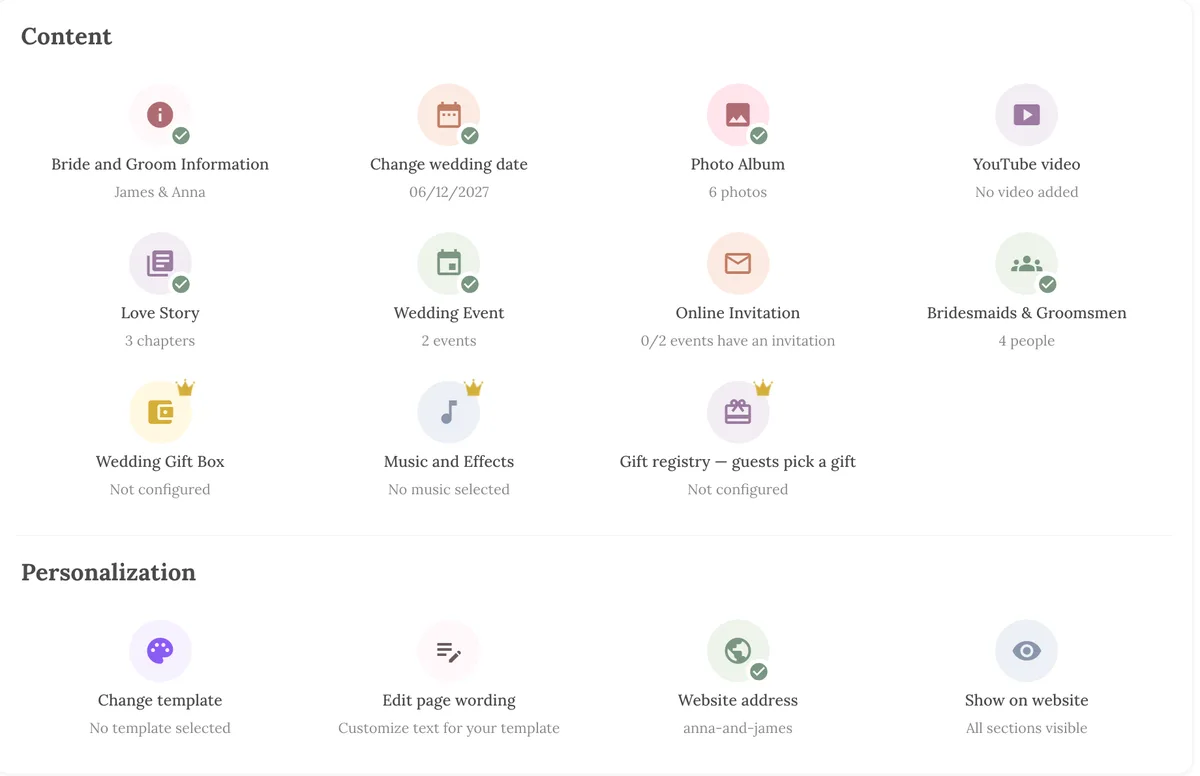
On Wedding Plan these map to real sections. Bride and Groom Information holds names, a cover photo and a short line about each of you. The date drives the calendar and countdown on the cover. Wedding Event takes a name, date and time, venue, address, a map link and a photo for each event, and guests get a View Map and an Add to Calendar button. Every site has an RSVP button.
The nice-to-haves
These make the site feel like yours. None are required, and a short, complete site beats a long, half-empty one.
- A few photos. Engagement shots or everyday photos of the two of you. Six good photos are better than thirty similar ones. (The free plan holds 6 album photos, VIP 20 and SUPER VIP 50.)
- Your story. Two to four short chapters: how you met, a favourite trip, the proposal. Keep each to a few sentences. Wedding Plan's Love Story section gives each chapter a date, a title and a photo.
- The wedding party. A photo and one line for each bridesmaid and groomsman ("Maid of honour and Anna's little sister"). Guests like putting faces to names before the day.
- A guest book. A space where guests leave wishes. Older relatives who won't write a speech often love this. On Wedding Plan it's the Guest Book, and you read new wishes in the app.
- A video. A pre-wedding film or a slideshow, added as a YouTube link.
- Travel and stay. For guests coming from out of town: nearest station or airport, parking, a couple of hotels. See our guide to the wedding website travel and accommodations page.
- Practical answers. Dress code, whether the ceremony is indoors or outdoors, whether there's parking, what time the evening ends. A few short lines answer most of the questions you'd otherwise get by text.
- Gifts. A registry link or cash-gift details, kept short and low on the page. On Wedding Plan the Wedding Gift Box (bank details and a QR code) and the Gift registry are part of the paid plans, as is background music.
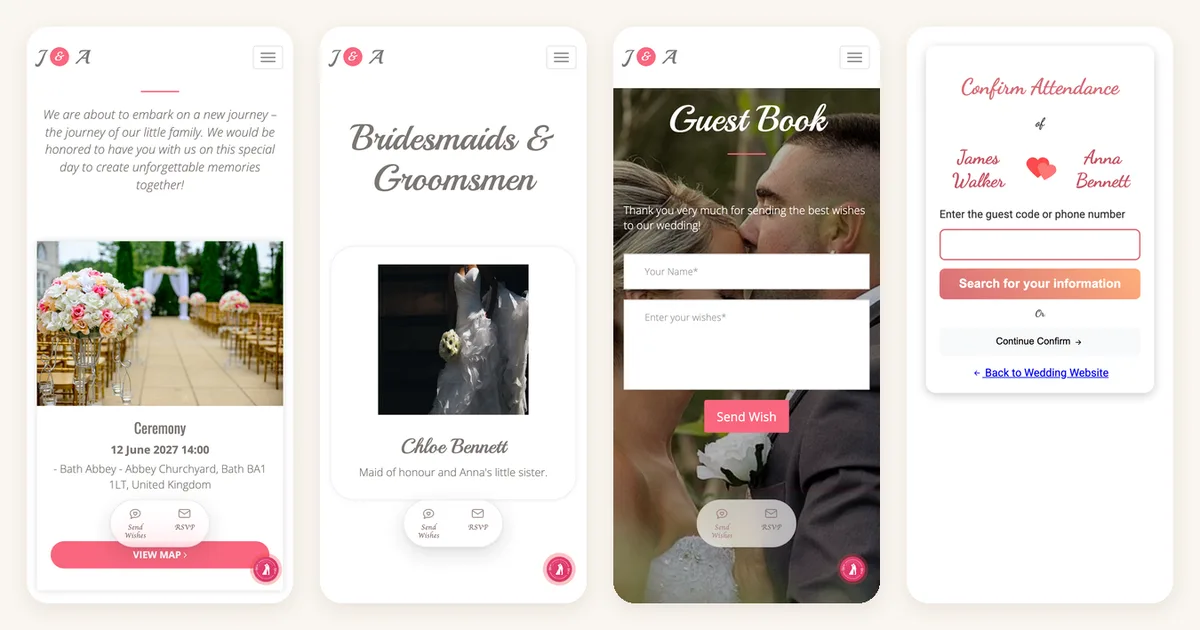
One honest limit: Wedding Plan has no separate FAQ or dress-code field. Each section has a heading and a short intro text you can rewrite under Edit page wording, so short notes like "Garden ceremony, flat shoes recommended" fit there.
What not to put on a wedding website
Most wedding websites can be opened by anyone who has the link. Links get forwarded, screenshotted and pasted into group chats. Write as if a stranger might read it.
- Your home address. Don't list where you live, even for "send gifts here". Share it privately with people who ask.
- Door codes, gate codes, Wi-Fi passwords, key locations. Not for the venue, not for the house where guests are staying. Send these by message.
- When your home will be empty. "We're away on honeymoon from 13 to 27 June" is useful information for the wrong reader. Share honeymoon dates after you're back.
- Phone numbers of people who didn't agree. Ask before you publish anyone's number, including parents.
- Other people's photos or names without asking. Check with your bridesmaids before their photo and a joke caption go up. And never show children's names next to their photos.
- Long inside jokes and ex stories. Your grandparents and your boss may read your love story.
- Budget talk and vendor complaints. Nobody needs the price of the venue.
- Every last detail of the day. A full minute-by-minute schedule makes the page long. Guests need arrival times, not the order of speeches.
A note on privacy settings: couple sites on Wedding Plan are hidden from Google (they carry a "noindex" tag), so they don't show up in search. There's no password, though, so anyone with the link can open the site. That's another reason to keep the details above off the page.
Wedding website etiquette
Registry and gifts: mention, don't push
It's fine to have a registry or cash-gift section. Guests often look for it. Keep it on its own section, low on the page, with a short friendly line such as "Your presence is the only gift we need. If you'd like to give something, here's where to find it." Don't put registry details on the cover, and don't repeat them on every page. On the printed invitation, a link to the website is enough.
Be clear about who's invited
A website is the easiest place to cause confusion here, because everyone sees the same page. A few rules:
- Say it directly. "We love your little ones, but this is an adults-only celebration" is kinder than leaving people to guess.
- Plus-ones: say how you handle them. "Your invitation will list everyone invited" works if your invitations name each guest.
- Smaller events: if only close family is invited to the ceremony or a rehearsal dinner, don't list it on the public page where every guest sees it.
On Wedding Plan, each event has a Show on website switch. A hidden event isn't listed on the public site, but guests you invite to it can still open their own invitation. Combined with personalized invitation links, each guest sees their own name on an invitation to the event they're actually invited to.
Hide what isn't ready yet
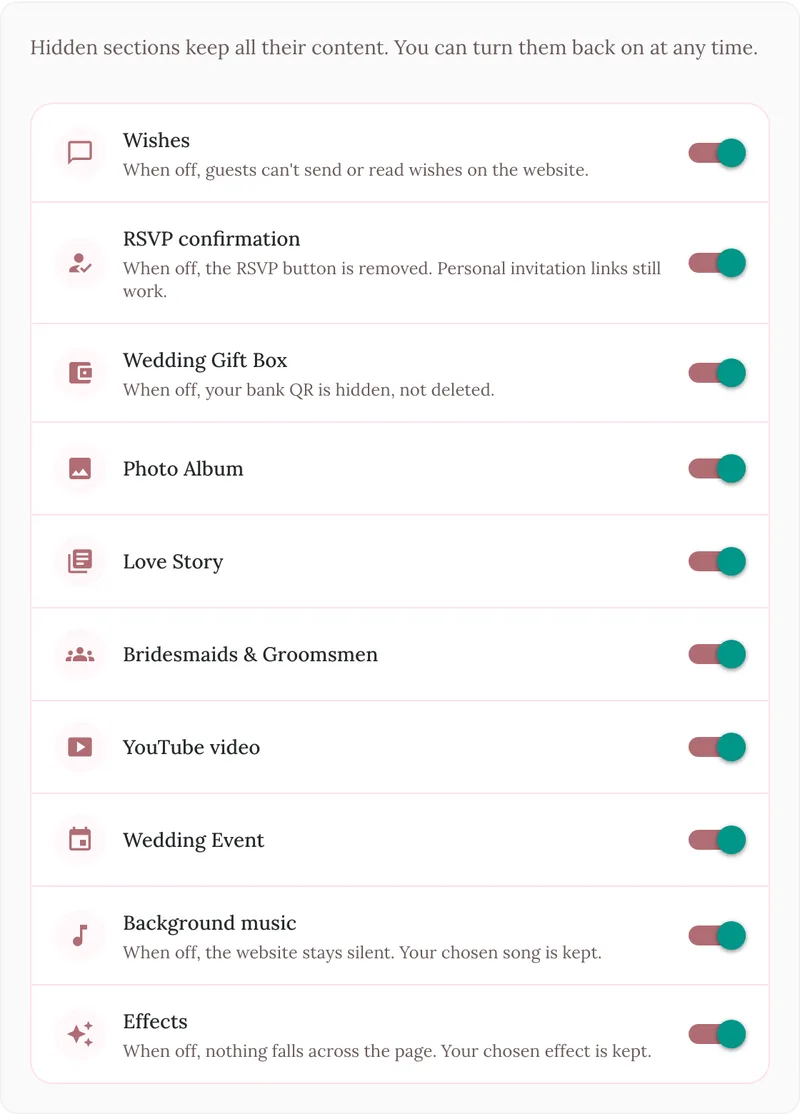
An empty "Our Story" heading looks unfinished. Hide a section until it's ready rather than leaving it blank. In Wedding Plan, Show on website lets you switch off whole sections (wishes, RSVP, gift box, album, love story, wedding party, video, events, music and effects) without deleting anything. You can turn them back on at any time.
Keep it up to date
If the time or venue changes, update the site first, then tell guests the site has changed. Once a site has the wrong date on it, nobody trusts it again.
Wedding website checklist
Copy this, print it or tick it off on your phone.
Must-haves
- ☐ Your names as guests know them
- ☐ Wedding date (and countdown)
- ☐ Each event: name, date, start time, venue, full address, map link
- ☐ RSVP button and RSVP deadline
- ☐ Who's invited: children, plus-ones
- ☐ Contact person for questions
Nice-to-haves
- ☐ Cover photo and a few album photos
- ☐ Short love story (2 to 4 chapters)
- ☐ Wedding party with photos
- ☐ Guest book for wishes
- ☐ Video link
- ☐ Travel, parking and hotels
- ☐ Dress code and practical notes
- ☐ Registry or gift details, low on the page
Leave off
- ☐ Home address
- ☐ Door, gate and Wi-Fi codes
- ☐ Honeymoon dates (while you're away)
- ☐ Other people's phone numbers or photos without asking
- ☐ Events not everyone is invited to
Before you send the link
- ☐ Open the site on your phone and check every section
- ☐ Tap every map link and the RSVP button
- ☐ Hide empty sections
- ☐ Ask one friend to read it and tell you what's unclear
FAQ
What is the most important thing to put on a wedding website?
The date, the time and the full address of each event, plus a way to RSVP. Everything else is a bonus.
Should I put my registry on my wedding website?
Yes, that's where guests expect to find it. Keep it in its own section with a short, warm line, and leave it off the cover and the printed invitation.
Is it OK to have a wedding website for a small wedding?
Yes. A one-page site with the date, place, map and RSVP saves you answering the same questions over and over, whatever the guest count.
Can I add things to the website later?
Yes. Publish with the basics and add photos, your story and travel tips as you go. Guests always see the latest version at the same link.
How do I write the text?
Short and warm. One or two sentences per section is enough. Write the way you'd talk to an aunt, not the way you'd write a formal invitation.
Next steps
New to all this? Our complete wedding website guide explains what a site is for and how the pieces fit together.
Ready to fill in your own? Start with the free wedding website builder and browse the wedding website templates. If you haven't built the site yet, our guide on how to make a wedding website walks through each step, and the wedding guest list keeps track of who replied.