Wedding Website FAQ Examples: 30 Questions Guests Actually Ask
30 wedding website FAQ examples, from parking and dress code to kids, plus-ones, weather and gifts, with short answers you can copy. Plus how to add them to a Wedding Plan site, which has no separate FAQ section.
Every couple gets the same questions in the weeks before the wedding. Where do I park? Can I bring my kids? What does "smart casual" mean? These wedding website FAQ examples cover the 30 questions guests ask most, grouped by topic, with short answers you can copy and change to fit your day.
Pick the ones that apply to you. Most weddings need eight to twelve, not all thirty. A short FAQ that people actually read beats a long one they scroll past.
Disclosure: Wedding Plan is our product and the screenshots come from it, using a sample couple (James and Anna, Bath, 12 June 2027). The questions work on any wedding website.
Wedding website FAQ examples by topic
Timing and arrival
1. What time should I arrive?
The ceremony starts at 2pm sharp. Please arrive by 1:30pm so you have time to find a seat.
2. What time does the party end?
Music stops at midnight. Taxis are booked for 12:15am.
3. Is there parking at the venue?
Yes, free parking for about 40 cars next to the barn. It fills up, so share a ride if you can.
Getting there and getting around
4. How do I get from the ceremony to the reception?
It's a 10-minute drive. Directions and a map are under each event above.
5. Is there a shuttle?
A minibus leaves the church at 3:30pm and comes back to the town centre at midnight. Tell us when you reply if you'd like a seat.
6. Where should I stay?
Rooms book up fast in June. Message us and we'll send the three hotels we recommend near the venue.
If many guests travel, a full wedding website travel and accommodations page answers these better than one line.
Dress code
7. What's the dress code?
Smart summer: suits without ties are fine, dresses any length. Bright colours welcome.
8. Is it indoors or outdoors?
The ceremony is indoors. Drinks are on the lawn, so wear shoes that work on grass and bring a layer for the evening.
9. Can I wear white?
We'd love you to save white and ivory for the bride. Any other colour is perfect.
Children
10. Are children invited?
We love your little ones, but this is an adults-only celebration. Babies in arms are welcome.
11. Is there childcare?
No, but we're happy to share the number of a local babysitter we trust. Just ask.
Plus-ones
12. Can I bring a plus-one?
Your invitation names everyone who's invited. If you're not sure, message us and we'll tell you honestly.
13. My partner isn't on the invitation. Is that a mistake?
Please ask us. Mistakes happen, and we'd rather fix one than have someone feel left out.
RSVP and changes
14. When do I need to reply by?
Please RSVP by 15 May 2027 using the RSVP button on this website.
15. How do I RSVP for my whole family?
One reply is enough. Choose how many people are coming for each event.
16. I said yes but now I can't come. What do I do?
Open your invitation link again and change your answer, or send us a message. No explanation needed.
17. Can I change the number of people coming?
Yes, up to the deadline. After that, please message us so we can tell the caterer.
Food, drink and dietary needs
18. I have an allergy or a special diet. How do I tell you?
Please text us when you reply. Vegetarian, vegan and gluten-free meals are all possible.
19. Will there be food at the evening party?
Yes. A pizza van arrives at 9pm for anyone still dancing.
20. Is there a bar?
Drinks are on us until 8pm. After that the bar takes cards.
Accessibility
21. Is the venue step-free?
Yes. Both venues have level entrances and an accessible toilet. Parking spaces near the door are kept for guests who need them.
22. Will there be seating outside?
Yes, benches and chairs on the lawn. If you'd like a seat near the front for the ceremony, tell us and we'll save one.
Weather plan
23. What if it rains?
Everything moves into the marquee. The plan stays the same, just drier.
24. Will it be cold in the evening?
June evenings can drop to 12°C. Bring a jacket or a wrap.
Photos and phones
25. Can I take photos during the ceremony?
We're having an unplugged ceremony. Please keep phones away until we're married. Our photographer has it covered.
26. Can I post photos on social media?
After the ceremony, go for it. Please wait until we've shared our first photo before posting the dress.
27. Where will we see the photos?
We'll add a few to this website after the wedding. Send us yours too!
Gifts
28. Do you have a registry?
Your being there is the best gift. If you'd like to give something, the details are in the gift section of this site.
29. Should I bring a card or gift on the day?
There will be a card box at the reception. Please don't bring large gifts, we're flying out the next week.
Questions on the day
30. Who do I call if I'm lost or late?
Text Tom, our best man. He'll have his phone on him all day. (We won't.)
How to write wedding website FAQ answers
- Lead with the answer. "Yes, free parking for 40 cars" before any explanation.
- Use real numbers. Times, dates, distances. "Arrive early" means something different to everyone.
- Be kind about the no's. Children, plus-ones and white outfits are where a warm sentence saves an awkward call.
- Say who to ask. A named person beats "contact us".
- Leave out anything private. Door codes, your home address and honeymoon dates belong in a private message, not on a page anyone with the link can open.
For more ready-made text (welcome messages, event intros, RSVP lines), see what to put on a wedding website and our wedding website RSVP guide.
How to add an FAQ on Wedding Plan
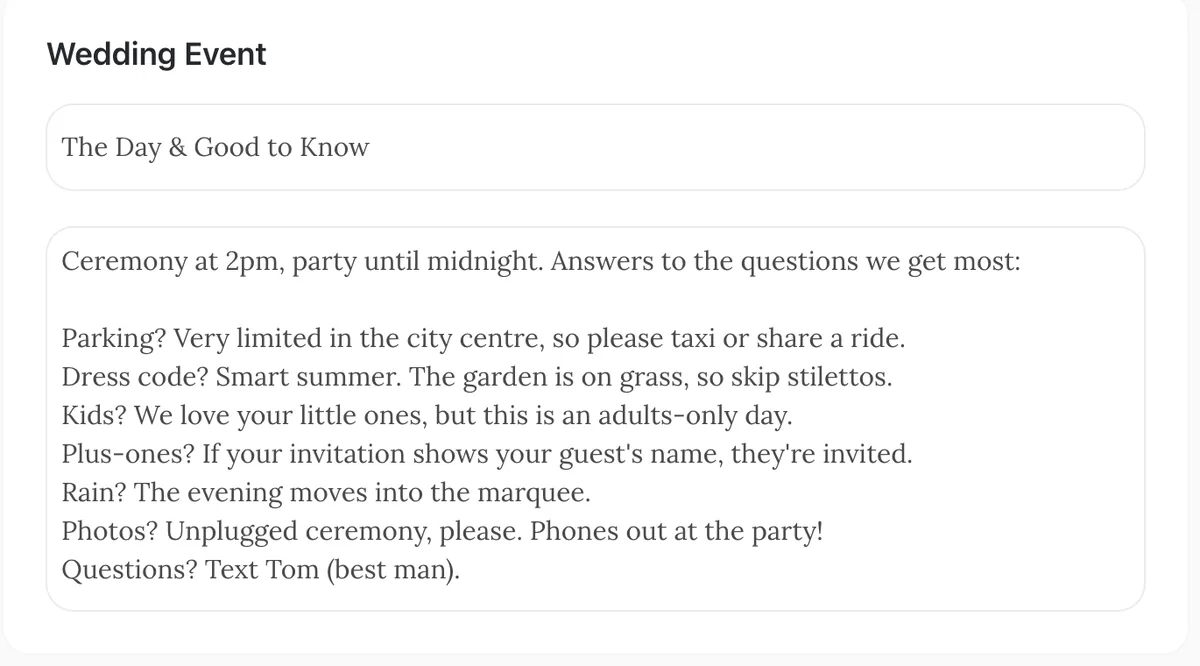
To be upfront: Wedding Plan has no separate FAQ section. There's no question-and-answer block to fill in. What every site does have is Edit page wording, where you can rewrite the heading and the short intro text of each section. That's where your FAQ goes.
The simplest way: the event intro
- On the website dashboard, open Edit page wording.
- Find the Wedding Event card. The first box is the heading, the second is the intro text shown above your event cards.
- Change the heading if you like, for example "The Day & Good to Know".
- Type your questions into the intro text, one per line: "Parking? ...", "Dress code? ...".
- Tap Submit, then refresh your site to check it.
This puts the answers right above the times, addresses and map buttons, which is where guests look anyway.
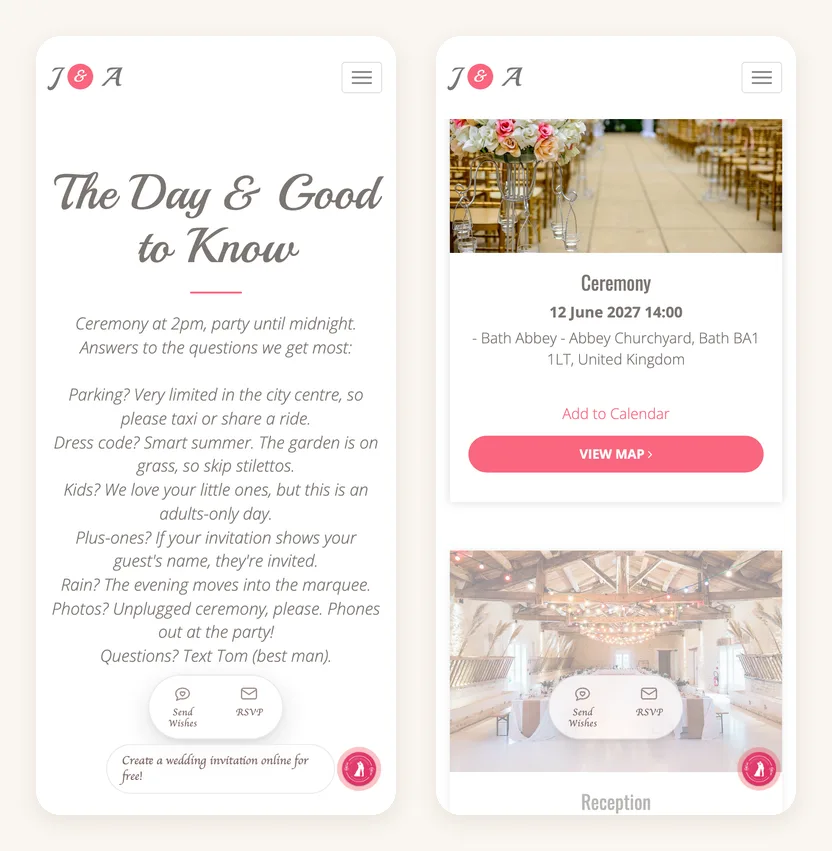
A few things to know before you write:
- Plain text only. Line breaks are kept, but there's no bold and links aren't clickable. Start each line with the question and a question mark, so it scans.
- Keep it short. In many designs the intro is centred and in italics, so eight lines is about the limit before it gets hard to read. Pick your top questions.
- Check the preview. Most designs show the intro texts, but a few show only the headings. If yours doesn't, use a design that does or send the FAQ with your link.
- One language at a time. Your texts are saved for the site language you picked. If you switch the site language later, the default texts for the new language come back, so recheck this page.
Spread answers across sections
If one block feels crowded, put each answer next to the section it belongs to. The gift question can go in the Wedding Gift Box intro (gift box is a paid feature), the photo question in the Wedding Gallery intro, and "who to text on the day" in the Guest Book intro. Guests find the answer where they're already looking.
We don't recommend using Love Story chapters as questions. Each chapter needs a date, and the section looks like a timeline, so it reads oddly.
Dietary needs are the one topic the website can't collect: the RSVP form asks only for attendance and how many people are coming. Ask guests to message you, as in question 18.
FAQ
Should a wedding website have an FAQ?
Yes, if you keep getting the same questions. A few short answers about parking, dress code, kids and plus-ones save dozens of messages.
How many questions should a wedding FAQ have?
Eight to twelve is plenty for most weddings. Start with the ones people have already asked you.
Where should the FAQ go on the website?
Near the event details, since most questions are about the day itself. On Wedding Plan, that's the Wedding Event intro text.
Next steps
Ready to write yours? Start with the free wedding website builder and pick one of the wedding website templates. For the full picture of what a wedding website can do, read our guide, and when the site is ready, see how to share your wedding website with guests.