How to Make a Bilingual Wedding Website
How to make a bilingual wedding website that works for both families: what to translate, layouts that work, dates and times, clear RSVPs and getting the translation right.
When your families speak different languages, one wedding website has to work for both. Grandma in Lyon and your college friends in Chicago should both understand when to arrive, where to go and how to reply. A bilingual wedding website doesn't mean translating every word. It means making the important parts clear in both languages and keeping everything else short.
This guide covers what to translate (and what to skip), three layouts that work, how to write names, dates and times so nobody gets confused, how to keep RSVPs clear, and how to get a translation you can trust.
Disclosure: Wedding Plan is our product and the screenshots come from it. The advice works with any wedding website builder, and we're clear below about what our tool does and doesn't do.
What to translate on a bilingual wedding website (and what not)
Guests visit your site to answer a few practical questions. Those answers need to be in both languages. The rest can stay in one language, or be a short summary in the second.
Always translate:
- Event details: the name of each event, the time, the venue and the address notes. "Ceremony / Ceremonia" is enough for a title.
- The RSVP request: the deadline and what you need guests to do.
- Travel notes: how to get there, parking, the nearest airport or station. Guests coming from abroad need these most.
- Anything that changes behaviour: dress code, an adults-only note, a gift preference.
Fine to keep short or in one language:
- Your love story. Write it in full in one language and add two or three lines in the other.
- Photo captions and personal introductions.
Names of people and places don't get translated. Write "Bath Abbey", not a translated version, because that's what guests will see on road signs and in their map app.
Three layouts that work
1. Side by side in the heading, stacked in the text
Short headings take both languages on one line, separated by a dot or slash: "Our Wedding · Nuestra boda". Longer texts get one paragraph per language, always in the same order.
2. One language per section
If most guests read language A, write the whole site in A and add a short block in language B to the sections that matter: events, RSVP, travel. This keeps the page short and still gives everyone what they need.
3. Two separate sites
Some couples run one site per language. It reads cleanly, but it doubles your work: every change has to be made twice, and RSVPs end up in two places. On Wedding Plan, one account has one website, so a second site would mean a second account and a second guest list. We don't recommend it for most weddings. Layout 1 or 2 on a single site is easier to keep up to date.
How Wedding Plan handles languages
- One site language for buttons and headings. In the web app, go to Couple Information and scroll to Website Settings. The Language setting has 34 options. It controls the menu, buttons, default headings and the RSVP form labels. You can change it later.
- Every visitor sees the same language. The site doesn't switch language per visitor or per browser, and there is no language toggle for guests. Personal invitation links also open in the site language.
- Your own texts can be in any language, or two. Names, introductions, love story, event names and venues are free text.
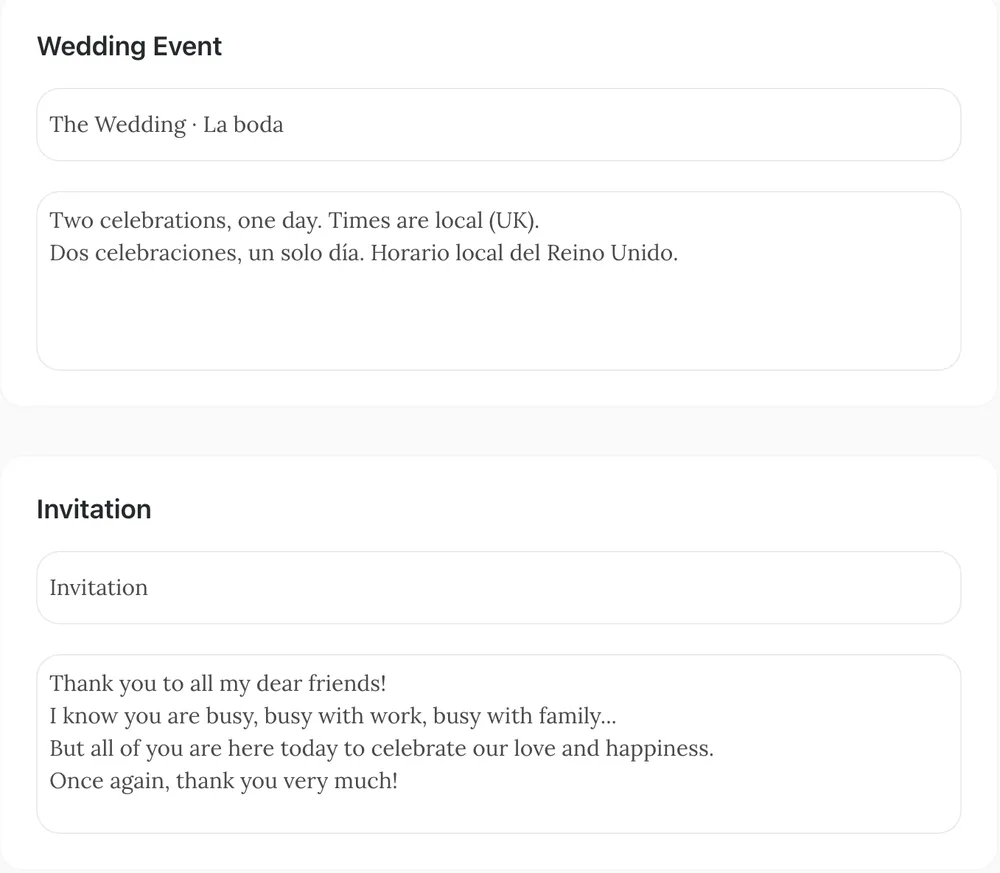
- Section headings and intros are editable. Under Edit page wording you can rewrite the heading and short text of eight sections: video, gallery, love story, wedding party, events, invitation, gift box and guest book. That's where a bilingual heading like "The Wedding · La boda" goes.
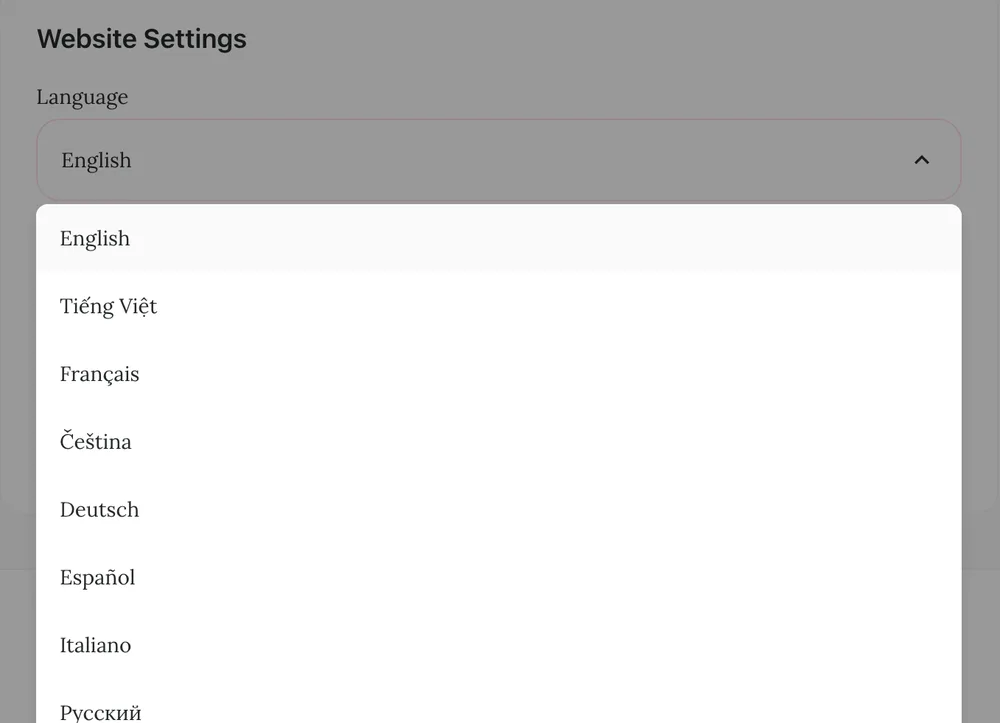
So which site language should you pick? The language of the guests who will find the site hardest to use. People who are comfortable with both languages will cope with buttons in either. Your older relatives may not.
One tip: choose the site language first, then edit the wording. Your custom headings are saved for the language they were written in. If you switch the site language afterwards, the default headings of the new language appear, and your own text only comes back if you switch back.
Names, dates and time formats
This is where bilingual sites go wrong most often, because the same numbers mean different things in different countries.
- Write the month as a word. 06/12/2027 is 6 December in most of the world and June 12 in the US. "12 June 2027" or "June 12, 2027" can't be misread.
- Be clear about the clock. 14:00 is clear to most of the world; many American guests prefer 2 pm. Wedding Plan shows event times in 24-hour format, so if your guests think in am/pm, add it in your event text ("2 pm").
- Name the time zone for guests in other countries: "All times are UK time."
- Agree on how names appear. Some cultures put the family name first, some use two surnames, some use a different script. Decide together how your names appear and use it the same way everywhere. If one family reads another script, consider adding your names in that script in your introduction.
- Check the preview with real line breaks. In the free design we tested, line breaks show up in the introductions and section texts, but a love story entry runs as one paragraph. Preview each section before you share the link.
Keep RSVPs clear in both languages
The RSVP form itself appears in the site language. On Wedding Plan it asks for a name and phone number, then for each event whether the guest will attend and how many people are coming. Guests who don't read that language can still get through it if you explain it nearby.
- Put the instructions in both languages in the invitation section text: "Please reply by 1 May. Tap RSVP, choose yes or no for each event and how many people are coming." Then the same in the second language.
- Give each event a two-language name, such as "Ceremony / Ceremonia" and "Dinner / Cena", so guests know which one they're answering for.
- Use personal links for relatives who need help. A personalized wedding website link for each guest opens an invitation with the guest's name already filled in, so they don't have to type it. Elderly relatives and guests reading in their second language get the most out of it.
- Ask about meals or allergies separately. The form has no meal or dietary field, so write a line in both languages asking guests to message you.
Our wedding website RSVP guide has more on deadlines and reminders.
Translation quality: who should translate
Machine translation is a fine first draft. It's a poor final version for anything a guest acts on. A wrong word in a love story is charming. A wrong time or a confusing direction means someone arrives late at the wrong door.
- Write short first. Short, plain sentences translate better, whether a person or a machine does it.
- Ask a family member who is a native speaker to read the key parts: events, RSVP, travel. They'll also catch tone. Formal and informal "you" matter a lot in some languages.
- Check numbers by hand. Times, dates, addresses and phone numbers should be identical in both versions.
- Read it on a phone. Two languages make texts twice as long. If a section feels like a wall of text on a small screen, cut it down.
FAQ
Can guests switch the language of my wedding website?
On Wedding Plan, no. The site has one language for buttons and headings, and every guest sees it. You can write your own texts in two languages, which covers what most guests need.
Should every section be in both languages?
No. Translate the practical parts (events, RSVP, travel, dress code) and keep the rest short. A full translation of a long love story often makes the page harder to use, not easier.
Are personal invitation links in each guest's language?
No. They open in the site's language, with your own texts as you wrote them. If your invitation text is in two languages, every guest sees both.
Next steps
For the full picture of planning, writing and sharing a wedding website, start with our guide, and see what to put on a wedding website before you start translating. When you're ready, set up your site with our free wedding website builder, choose the site language first, and write your two-language texts from there.