Wedding Guest List Template: What to Track and How to Cut the List
A wedding guest list template you can copy, the columns that matter, A/B/C guest tiers, and fair rules for cutting the list: plus-ones, kids, coworkers and the last-three-years rule.
Every big wedding decision (the venue, the budget, the catering order, how many invitations to send) depends on one document: the guest list. Get it into shape early and the rest of the planning gets easier. Leave it as a loose list of names and you'll be redoing your sums for months.
Disclosure: Wedding Plan is our product and the screenshots come from it. The template and the cutting rules work just as well in a spreadsheet or on paper.
This guide gives you a wedding guest list template you can copy, the columns that actually matter, a simple A/B/C tier system, and clear rules for cutting the list without starting a family feud.
The short version
- Set the number before the names. Your budget and the venue capacity decide the maximum; the list has to fit inside it.
- Count people, not invitations. One line for "The Thompson Family" can be four seats.
- Tier everyone A, B or C so cutting becomes a sorting exercise instead of an argument.
- Agree on blanket rules for plus-ones, kids and coworkers, and apply them to everyone.
- Track RSVPs per event if you have more than one (ceremony, reception, welcome drinks).
The wedding guest list template
Copy these columns into Google Sheets, Excel, Numbers or a notes app. Each row is one invitation: a single person, a couple or a household. The sample rows are made up.
| Name | Household / plus-one | Side | Tier | Events invited | Contact | RSVP status | Party size |
|---|---|---|---|---|---|---|---|
| The Thompson Family | Household: Mark, Jen, 2 kids | Partner 1 | A | Ceremony, Reception | Jen, phone | Confirmed | 4 |
| Hannah Lewis | Partner: Marcus Reid (named) | Partner 2 | A | Ceremony, Reception | Phone | Confirmed | 2 |
| Liam Walsh | Plus-one: no | Both | B | Reception | Awaiting | 1 | |
| Megan Ross | Plus-one: "and Guest" | Partner 2 | B | Reception | Phone | Awaiting | 2 |
| Ryan Patel | Plus-one: no | Partner 1 | C | Reception | Phone | Declined | 0 |
What each column is for:
- Name: the name you'll write on the invitation. For families, "The Thompson Family" works, but note who is actually included in the next column.
- Household / plus-one: who else the invitation covers. Write partners' names when you know them; write "and Guest" only when you're genuinely allowing an unnamed plus-one.
- Side: whose guest this is (each partner's side, or "both" for shared friends). Useful when you split seats between families.
- Tier: A, B or C (explained below). This is the column that makes cutting possible.
- Events invited: ceremony, reception, rehearsal dinner, after-party. Not every guest goes to everything.
- Contact: phone or email, and for households, the one person who replies for everyone.
- RSVP status: Awaiting, Confirmed or Declined. Keep the wording consistent so filters and counts work.
- Party size: how many people from this row are coming. Before replies arrive, put the number invited; afterwards, the number confirmed.
Optional extras if you need them: mailing address (for printed invitations and thank-you cards), meal choice, dietary needs, gift received, thank-you sent. Don't add twenty columns on day one; a list you actually keep up to date beats a perfect one you abandon.
Two formulas worth adding
In Google Sheets or Excel, put these under the table (assuming tier is column D, status column G and party size column H):
- People invited in tier A: =SUMIF(D:D,"A",H:H)
- People confirmed: =SUMIF(G:G,"Confirmed",H:H)
The first one tells you instantly whether your A list already fills the venue. The second is the number your caterer will ask for.
Wedding guest list categories: the A/B/C tiers
Sorting people into tiers is the single most useful thing you can do with a long list. A common setup:
- Tier A: the wedding doesn't happen without them. Parents, siblings, grandparents, the wedding party, your closest friends and their partners.
- Tier B: people you really want there. Aunts, uncles and cousins you see, good friends, friends who are part of your life today.
- Tier C: nice to have. Old friends you've drifted from, neighbors, coworkers, your parents' friends, plus-ones for single guests.
Write the A list first, separately, then compare it. If tier A alone is already close to your maximum, you know the B list will be small, and you can have that conversation now rather than after the invitations are designed.
Some couples keep a short reserve list from tier B: people you'll invite if early declines free up space. If you do this, send those invitations promptly. An invitation that arrives three weeks before the wedding reads as "you were on the backup list", and people notice.
How to build the list in five steps
- Set your maximum. Look at what you can spend per guest and how many people your favorite venues hold. Our wedding budget breakdown shows how the guest count drives catering, rentals and stationery.
- Brain-dump separately. Each of you (and each set of parents, if they're contributing) writes a raw list without filtering. Scrolling through your phone contacts helps you not forget anyone.
- Merge and count seats, not rows. Seventy rows can easily be a hundred and twenty people once partners and children are counted.
- Split the seats. Decide how seats are divided before you start cutting: an even split between sides, proportional to family size, or a set number for parents who are paying. Agreeing on this first avoids "your side got more" arguments later.
- Tier, then cut using the rules below.
How to cut your wedding guest list
Cutting is easier with rules you apply to everyone than with case-by-case decisions. Pick the rules together, then let them do the work.
The "last three years" rule
If neither of you has seen or properly talked to someone in the last three years, they don't make the list. Some couples use one year for friends and three for family. It's simple, neutral and easy to explain if anyone asks.
Other quick tests
- Would you take them out to dinner? If you wouldn't pay for their meal on a normal Saturday, think twice about paying for it at your wedding.
- Have they met both of you? Someone who has never met your partner is usually a C.
- Are you inviting them out of obligation? "They invited us to theirs" is a reason to consider someone, not an automatic yes.
Plus-ones
The most common rule: married, engaged and live-in partners are invited by name, and long-term partners usually are too. Unnamed plus-ones ("and Guest") go only to guests who won't know anyone else, or to members of the wedding party. Whatever you choose, apply it to everyone; nothing causes more friction than one cousin getting a plus-one and another not. Remember that an unnamed plus-one takes up a full seat in your count from day one.
Kids
Choose one policy and stick to it: all children welcome, an adults-only wedding, only immediate family's children, or kids at the ceremony but not the evening reception. Making exceptions family by family rarely goes well. If you go adults-only, address the invitations precisely to the adults; our guide to RSVP wording has polite lines for adults-only and limited-seat invitations.
Coworkers
Either invite the whole immediate team or only the coworkers you see outside work. Inviting half a department is how you end up with awkward Monday mornings. Your manager doesn't need an invitation just because they're your manager.
Parents' guests
If parents are contributing, they'll often want to invite their own friends. Give them a fixed number of seats rather than vetoing names one by one. They choose who fills them.
When you still need to cut
Work from the outside in: drop tier C first, then unnamed plus-ones, then trim tier B evenly across both sides. If you still can't make it fit, the honest options are a smaller venue, a smaller ceremony with a bigger, cheaper party later, or a bigger budget.
Spreadsheet or app?
A spreadsheet is the best tool for the cutting stage: you can sort, filter, add columns and see the whole picture at once. Once the list is final and invitations go out, the hard part changes. You need to send invitations, collect replies and keep counts accurate, and that's where typing every answer into a spreadsheet gets tedious.
Many couples do both: draft and cut in a spreadsheet, then move the final list into a tool that handles RSVPs.
Tracking the final list and RSVPs in Wedding Plan
In the Wedding Plan guest list, you add each invitation as one guest (manually or from your phone's contacts), tick the events they're invited to and set the party size. One entry for the Thompsons with a party size of four works the same way as one row in the template above.
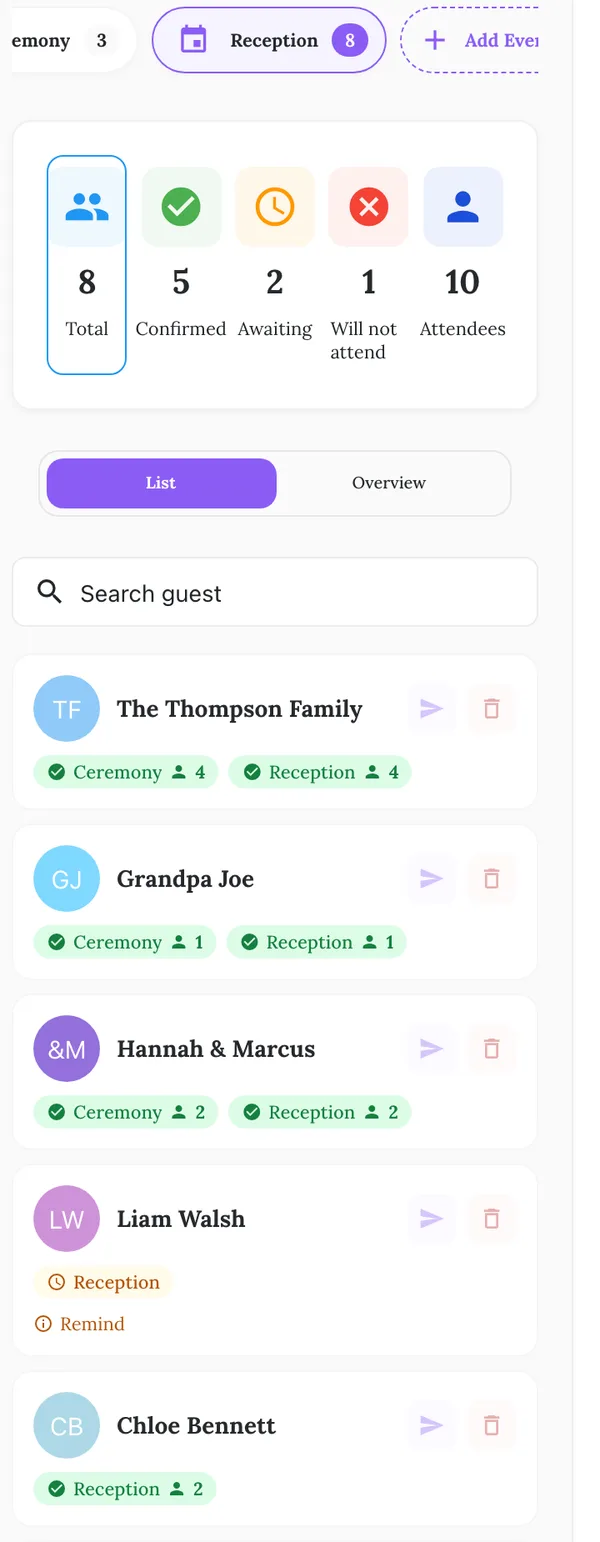
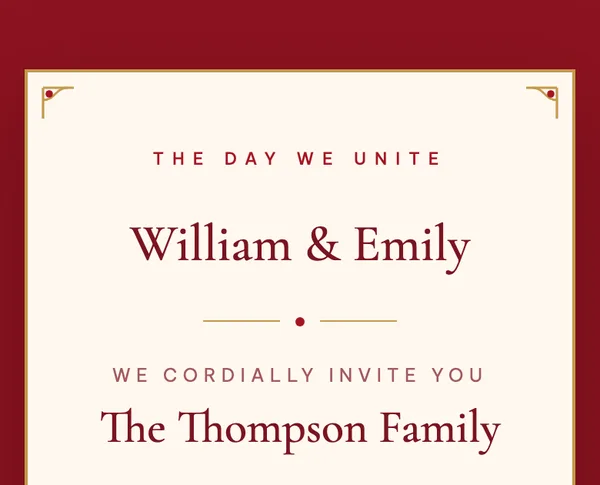
Each guest gets a personalized invitation link per event, with their name on the invitation. When they reply, their status and party size update on your list automatically, and they can open the link again to change their answer.
Some honest notes before you move your list over:
- The free plan holds 20 guest entries, which is small for most weddings. It's enough to try the RSVP flow with close family; VIP allows 50 entries and SUPER VIP is unlimited. A household entry counts as one entry, whatever its party size.
- There's no Excel or PDF export, no seating chart and no tier column, so keep your spreadsheet for the cutting stage. Guest groups (such as "Family" or "Work") are available on VIP and SUPER VIP.
- The RSVP form asks only two things: attending or not, and how many people (alone or with one to five others). There's no meal or dietary question; collect those separately.
- Check headcounts per event. Tap an event to see its own numbers; the all-events view adds up attendees across every event a guest is invited to.
- Reminders are manual: the Remind button opens your phone's share sheet so you can send a nudge yourself.
For setting up replies on your website, see how to collect RSVPs on your wedding website, and for where the guest list fits in the overall timeline, our wedding planning checklist.
Common guest list mistakes
- Counting invitations instead of people. Always total the party size column.
- Booking the venue before drafting the list. A rough count first saves you from a venue that's too small (or far too big).
- Vague names. "The Thompsons" when you only mean the parents, not the adult children. Be precise on the invitation and in your list.
- Telling people they're invited before the list is final. Casual "of course you're coming!" promises are the hardest to take back.
- Replies in five places. Texts, emails, cards and hallway chats all go into one list, the same day.
FAQ
What should a wedding guest list include?
At minimum: the name on the invitation, who else is included (partner, plus-one, children), which side they're on, a tier, the events they're invited to, contact details, RSVP status and party size. Add mailing address, meal choice or gifts only if you need them.
How do you cut a wedding guest list without offending people?
Use blanket rules and apply them to everyone: the last-three-years rule, a single policy on plus-ones and kids, whole team or no coworkers. Rules are easier to explain than individual decisions, and nobody feels singled out.
What are A, B and C lists for a wedding?
Tier A is people the wedding can't happen without, tier B is people you really want there, and tier C is nice to have. When you need to cut, you cut from C first, then from B.
Do I have to give every guest a plus-one?
No. A common rule is to invite married, engaged, live-in and long-term partners by name, and give unnamed plus-ones only to guests who won't know anyone else. Apply it consistently.
Should I keep my guest list in a spreadsheet or an app?
A spreadsheet is best for drafting and cutting. Once invitations go out, a tool that collects RSVPs and updates counts for you saves a lot of typing. Many couples use both, one after the other.